Noizz App – Video Editor With Music, Effects & Creative Templates

Noizzapp lets you create videos with music, effects, filters, templates, and photos. Learn features, download options, and tips.
Security Verified
| Information | Details |
| App Name | Noizz |
| Category | Video & Photo Editing |
| Main Purpose | Creating and editing short videos |
| Content Support | Photos and video clips |
| Creative Tools | Templates, music, filters and effects |
| Platforms | Mobile devices, subject to current availability |
| Best For | Quick creative videos and social-style content |
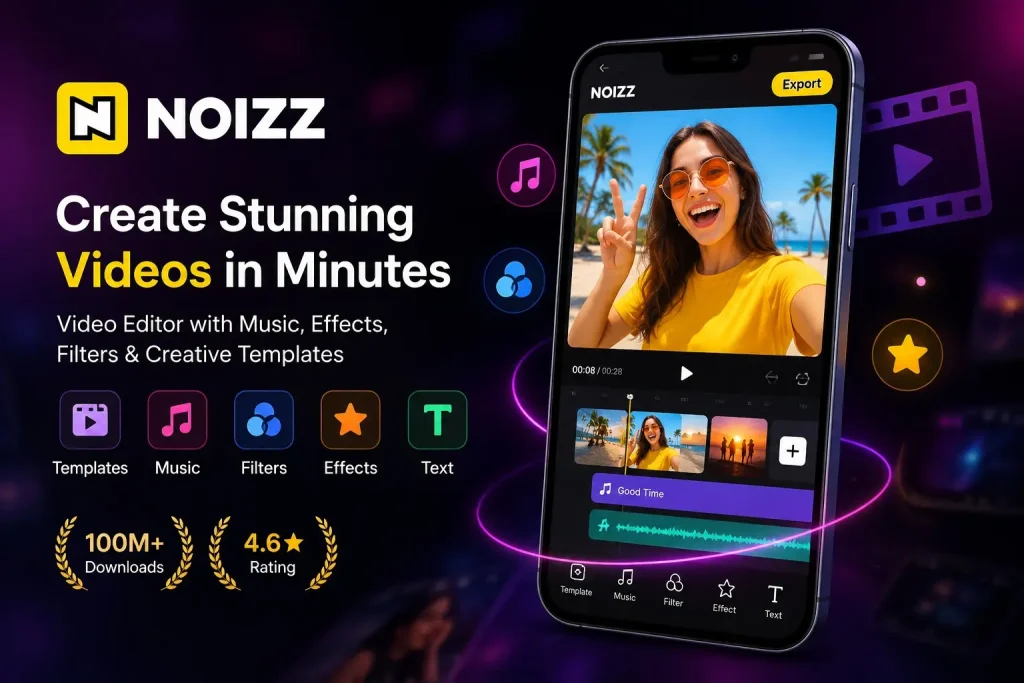
Noizz App is a creative video editing application designed for users who want to turn photos and video clips into engaging short-form content. Instead of requiring advanced editing skills, the app focuses on ready-made templates, music, filters, effects, and simple editing tools that make everyday video creation easier.
Whether you want to create a video from your favorite photos, add music to a short clip, apply creative effects, or prepare content for social media, Noizz provides a convenient editing workflow. This guide explains what Noizz App offers, its main features, download options, installation process, templates, and common solutions for users who experience problems.
What Is Noizz App?
Noizz App is a mobile-focused creative editor that helps users make videos without having to build every element manually. A typical project can start with photos or video clips, after which users can choose a suitable template, add music, apply effects, make adjustments, and prepare the finished video for sharing.
The app is particularly useful for people who prefer a faster template-based workflow. Instead of spending a long time arranging transitions and effects individually, a user can begin with an existing creative style and customize it with personal media.
Noizz can also be useful for photo-based projects. For example, several pictures from a birthday, trip, celebration, or personal event can be combined into a short video with music and visual effects.
Its straightforward approach makes it suitable for casual creators as well as users who regularly produce short-form content.
Noizz App Features
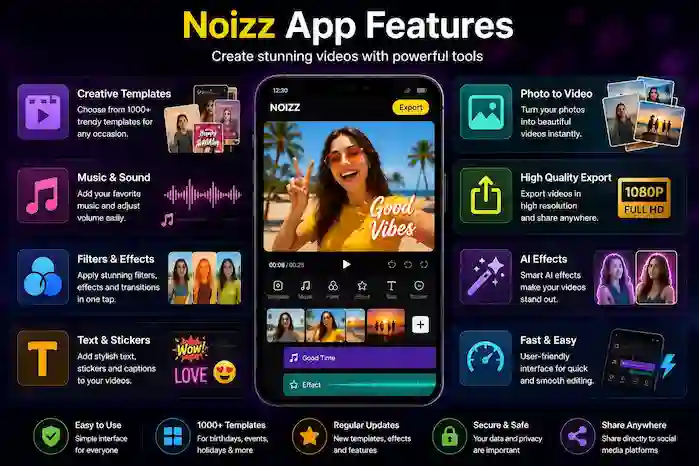
Noizz combines several creative tools in one mobile editing experience. The exact selection can change as the application receives updates, but the main experience centers on templates, media editing, music, effects, and sharing.
AI-Powered Filters and Effects
Creative effects can give ordinary photos and clips a different visual appearance. Depending on the version and available features, Noizz may provide AI-assisted effects or filters designed for particular visual styles.
These tools are useful when you want to create something more distinctive without manually adjusting every visual element. Rather than applying an effect blindly, it is better to preview different options and choose one that matches the photos or video you are editing.
Video Templates and Themes
Templates are one of the most convenient parts of a template-oriented video editor. A template can provide a predefined creative structure that users can personalize with their own photos or clips.
Templates can be useful for:
- Birthday videos
- Holiday memories
- Event highlights
- Photo collections
- Short social videos
- Personal celebrations
- Music-based edits
The available templates can change over time, so the selection you see may differ from another version or region.
Music and Sound Integration
Music can significantly change the feel of a short video. Noizz allows users to work with sound as part of the creative editing process, depending on the available tools and content.
Music can be particularly effective when creating photo-based videos because it gives a collection of still images a stronger sense of movement and timing.
When using music, always pay attention to copyright and platform-specific rules if you plan to publish the finished video publicly.
Photo-to-Video Creation
Noizz is also useful when your starting material consists primarily of photographs.
You can select several pictures and use a suitable template or editing style to create a short video. Adding music, transitions, filters, and effects can make the final result more engaging than a basic image slideshow.
This makes the app useful for users searching for a way to download the Noizz app for photo-based video creation.
Easy Editing Interface
A simple editing workflow can be more useful than a large collection of complicated professional controls when you only need to create a quick video.
Noizz is designed around a relatively accessible process:
Select media → Choose a style → Customize → Preview → Export
This approach can reduce the time needed to create short videos, especially for users who are new to mobile editing.
Quality Export and Sharing
After finishing an edit, users can preview their project before saving or sharing it. Export options and available quality settings depend on the current version of the app and device.
Before exporting a longer project, make sure your phone has enough free storage. High-quality video files can require considerably more space than the original photos.
Creative Effects and Filters
Filters and visual effects can be used to give a project a particular mood or appearance. They are especially useful when you want several photos or clips to have a more consistent visual style.
Using effects selectively usually produces a cleaner result than applying multiple effects to every part of a video.
Noizz Video Templates
Templates make Noizz particularly convenient for quick content creation. Instead of starting with an empty timeline, you can select an existing style and add your own media.
Birthday Templates
Birthday templates can turn personal photos and short clips into a celebration video. You can select pictures from the occasion and customize the project with suitable music or effects.
Holiday Templates
Holiday and seasonal templates can be useful for creating quick greeting videos or memory collections. They can save time when you want to share something without manually designing the entire project.
Event-Specific Templates
Events often involve many photos and short clips. A suitable template can combine them into a single video that is easier to share with friends and family.
Photo Templates
Photo templates are useful when you have more pictures than video footage. Instead of uploading a single image, you can combine several photos into a creative sequence.
Customizing Templates
After choosing a template, the available customization options may allow you to replace media, adjust elements, select music, or modify other parts of the project.
The exact controls depend on the selected template and app version.
How to Download Noizz App
If you want a Noizz App Download, the safest approach is to start with the official app distribution channel available for your device.
Download Noizz From the Google Play Store
For Android users, the normal process is:
- Open the Google Play Store.
- Search for Noizz.
- Check the app name and developer information carefully.
- Review the current version and permissions.
- Tap the install button.
- Wait for the installation to finish.
- Open Noizz and complete the initial setup.
Always verify that you have selected the correct application rather than an unrelated app using a similar name.
Download Noizz From the App Store
If a compatible Noizz listing is available for your Apple device, use the App Store rather than an unknown third-party download source.
Search for the app, review its listing information, and install it through Apple’s standard installation process.
Noizz App Download APK
An APK is an Android application package used to install an application manually. Users searching for Noizz App Download APK should pay particular attention to the source of the file.
Before installing an APK, check:
- App name
- Version number
- File size
- Android compatibility
- Developer information
- Required permissions
- Download source
Avoid installing files from suspicious websites or files that have been modified without clear information about their contents.
How to Install Noizz App
Installing Noizz Through an App Store
The easiest installation method is to use the official store available on your device. Search for Noizz, verify the listing, and select the installation option.
The store normally handles the required installation process automatically.
Installing Noizz APK on Android
If you have a legitimate APK that you specifically need to install manually:
- Download the APK from a source you trust.
- Locate the downloaded file on your Android device.
- Tap the APK file.
- Follow Android’s installation instructions.
- If Android asks for permission to install from that source, review the setting carefully.
- Complete the installation.
- Open Noizz after installation.
If the APK does not install, verify that the file is compatible with your Android version and that sufficient storage is available.
How to Use Noizz App
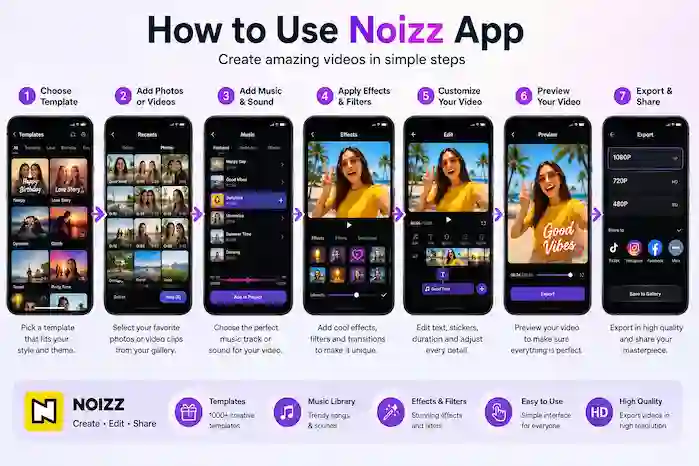
Using Noizz generally follows a straightforward creative workflow.
Choose a Template or Editing Option
Start by selecting a template or an appropriate editing option. Consider the type of content you want to make before choosing a style.
Add Photos or Videos
Select the photos or clips you want to include. For a photo-based project, choosing images with similar lighting or a consistent theme can make the final video look more polished.
Add Music and Sound
Choose suitable audio where the feature is available. If you intend to publish your video on a social platform, make sure you have the necessary rights to use the selected music.
Apply Effects and Filters
Experiment with filters and effects, but keep the overall style consistent. Too many effects can make a short video difficult to watch.
Customize Your Video
Review the available customization controls and make any necessary changes to your media, effects, music, or template elements.
Preview the Result
Always preview the entire video before exporting. Check transitions, timing, visual effects, and audio.
Export and Share
Once you are satisfied with the result, save or export the video using the available option. You can then share it through supported apps or platforms.
Noizz App for Android
Android users have several factors to consider before installing Noizz.
First, check whether your Android version meets the current requirements. Older devices may also experience slower editing performance, particularly with effects or high-resolution video.
Storage is another consideration. Video projects can take significant space, especially when they contain several clips or are exported at higher quality.
If you are installing an APK instead of using the Play Store, verify the file carefully before opening it. A third-party APK should not automatically be treated as equivalent to the official store version.
Noizz App Latest Version
Keeping Noizz updated can provide access to newer features, templates, performance improvements, and bug fixes when those changes are included in a release.
What’s New in the Latest Version?
Depending on the update, a new version may include:
- New creative effects
- Additional templates
- Interface improvements
- Bug fixes
- Performance improvements
- Compatibility updates
Always check the current release information rather than relying on an outdated version number published on another website.
Version Information
When evaluating a Noizz download, useful technical information can include:
- Version number
- Release/update date
- APK size
- Android requirement
- Package information
- Available permissions
This information helps users determine whether a particular release is suitable for their device.
Older Versions
Older versions can sometimes be useful for users with compatibility issues, but installing an outdated application can also mean missing security fixes, features, and improvements.
If you choose an older release, verify that it comes from a trustworthy source and is compatible with your device.
Noizz App Security and Privacy
Security should be considered whenever you install a mobile application, especially when downloading an APK outside the standard app store.
Is Noizz App Safe?
The safest approach is to obtain the application from a reputable official distribution channel whenever possible. If you use a third-party APK, verify the source and file before installation.
Do not assume that an APK is safe simply because a website labels it as “secure” or “verified.”
Noizz App Permissions
Before installing or updating the application, review the permissions requested by the current version. Video and photo editors commonly require access related to media files, cameras, microphones, or other device functions depending on their features.
Only grant permissions that make sense for the features you intend to use.
Privacy Considerations
Review the application’s current privacy information to understand how data may be collected, processed, or shared. Privacy practices can change when an application or its policies are updated.
Users should also avoid entering unnecessary personal information into apps and should keep their operating system and applications updated.
Noizz App Pros and Cons
Pros
- Template-focused video creation
- Supports photo and video-based projects
- Music and sound features
- Creative filters and effects
- Convenient for short-form content
- Accessible workflow for casual users
Cons
- Features can vary between versions and regions
- Some effects or templates may require additional resources
- Complex projects can be demanding on older devices
- Third-party APK downloads require additional caution
- Some creative content may have usage or copyright restrictions
Noizz App vs Other Video Editors
Noizz is best understood as a convenient creative editor rather than a replacement for every type of professional editing software.
| Feature | Noizz App | Traditional Video Editor |
| Ready-made templates | Strong focus | Depends on the editor |
| Quick video creation | Yes | Usually available |
| Photo-to-video projects | Supported | Common |
| Music integration | Supported | Common |
| Creative effects | Strong focus | Varies |
| Manual editing controls | Depends on version | Often more extensive |
| Beginner workflow | Template-oriented | Can be more complex |
If your priority is quickly turning photos and clips into creative short videos, a template-oriented application can be convenient. Users who require detailed timeline editing, advanced color correction, or professional production controls may prefer a more advanced editor.
Noizz App Download — Which Option Should You Choose?
Official App Store Download
This is generally the preferred choice for users who want a standard installation and convenient updates.
APK Download
Manual APK installation can be useful in specific situations, but users should verify the source, version, compatibility, and file before installing.
Older Version
An older release may help with compatibility in some situations, but it should be treated as a fallback rather than automatically being preferable to the current version.
The right option depends on your device and specific requirements.
Common Noizz App Problems and Solutions
Noizz App Is Not Installing
Check your available storage, Android compatibility, and the integrity of the installation file. If you are using an APK, consider switching to the standard app-store installation when possible.
Noizz App Keeps Crashing
Restart the device and make sure the application is updated. Closing other resource-intensive apps can also help on devices with limited memory.
Noizz App Is Running Slowly
Large video files and effects can require substantial processing power. Freeing storage, closing unnecessary background applications, and using smaller projects may improve performance.
Effects or Templates Are Not Loading
Check your internet connection and make sure the app has the permissions it needs. Some online content may also become unavailable when a particular template or effect is removed or changed.
Music Is Not Working
Check the selected audio, app permissions, volume settings, and internet connection where applicable. Music availability can also depend on licensing and region.
Video Export Is Failing
Make sure there is enough free storage and that the project is not too demanding for the device. Restarting the app and trying again can sometimes resolve temporary issues.
Noizz App Is Not Updating
Check your app store connection, available storage, device compatibility, and whether an update is currently available for your region.
Frequently Asked Questions About Noizz App
What is Noizz App?
Noizz App is a mobile creative video editing application focused on making short videos from photos and clips using templates, music, filters, effects, and other editing tools.
How do I download Noizz App?
You can look for the current Noizz listing through the appropriate official app store for your device. Always verify the application details before installing it.
Can I download Noizz App APK?
Android users may encounter APK versions of Noizz for manual installation. Before installing one, verify the source, version, compatibility, and file information.
Is Noizz App free?
The availability of free features, optional purchases, advertisements, or other restrictions can vary by version and region. Check the current app listing for the latest information.
Can Noizz create videos from photos?
Yes, Noizz is designed to support creative projects based on photos as well as video clips. Templates and effects can help turn a collection of images into a short video.
Does Noizz have video templates?
Templates are an important part of the Noizz editing experience. Available categories and designs can change over time.
Can I add music to Noizz videos?
Noizz provides music and sound-related editing features, although available audio and functionality can vary according to the current version and region.
Is Noizz App available for Android?
Noizz has been distributed for Android, but users should check the current listing and Android requirements before installing a particular version.
How do I install Noizz APK?
Download a compatible APK from a trustworthy source, open the file, follow Android’s installation instructions, and review any requested permissions before completing installation.
Why is Noizz App not working?
Common causes include outdated software, insufficient storage, device compatibility problems, network issues, or temporary application errors. Updating the app and restarting the device are useful first steps.
Final Verdict on Noizz App
Noizz App is aimed at users who want a convenient way to create visually engaging videos from photos and clips without spending a long time building every element manually. Its combination of templates, music, effects, filters, and straightforward editing makes it particularly suitable for quick creative projects and short-form content.
For a normal installation, users should start with the appropriate official app store. Those specifically looking for a Noizz App Download APK should verify the APK’s source, version, compatibility, and permissions before installing it.
Whether you are creating a birthday montage, a photo-based video, a short social clip, or a simple music edit, Noizz provides a template-oriented workflow that can make the process faster and more accessible.