
Noizz APK refers to the Android application package used to install the Noizz app on compatible Android devices. APK files are commonly associated with manual Android installation, while apps downloaded through an official app store are normally installed and updated through the store itself.
For users searching for Noizz APK, understanding the difference between an APK file and a regular app-store installation is important. The file’s source, version, compatibility, permissions, and security should all be checked before installation.
This guide explains what Noizz APK means, how it differs from a Play Store installation, what to consider regarding compatibility and permissions, and how to troubleshoot common APK-related problems.
What Is Noizz APK?
APK stands for Android Package Kit, the package format used by Android to distribute and install applications.
In simple terms, a Noizz APK is an Android application package containing the files required for the app to be installed on a compatible device.
An APK can be useful when an application is distributed outside the normal app-store installation process. However, not every APK found online is necessarily an authentic or safe copy of the original application.
That’s why the most important consideration isn’t simply finding a file labeled Noizz APK. You should also verify where the file came from and whether it corresponds to a legitimate version of the application.
Noizz APK vs Play Store Installation
There are two different concepts users often confuse: obtaining an APK manually and installing an application through an official app store.
Play Store Installation
With a normal app-store installation, users generally:
- Search for the application
- Verify the developer or publisher
- Review the available information
- Select Install
- Allow Android to complete the installation
Updates can also be managed through the store when supported.
APK Installation
An APK is an application package that can be installed manually on Android when the device and Android version support it.
The user has greater responsibility for checking:
- The file’s source
- Application version
- Compatibility
- Permissions
- File authenticity
- Security warnings
For most users, an official distribution channel is preferable whenever the application is available there.
Why Do People Search for Noizz APK?
There are several reasons someone might search for an APK rather than simply looking for an app-store listing.
For example, a user may be looking for:
- A particular application version
- Compatibility information
- An alternative installation method
- Information about older Android devices
- Details about APK files
- Troubleshooting information
However, searching for an APK does not mean that every third-party APK website is trustworthy.
A file should always be evaluated before installation.
Noizz APK Compatibility
Compatibility is one of the most important things to check before installing an APK.
An APK may not work correctly if it requires a newer Android version than the device provides. Compatibility can also depend on device hardware, available storage, processor capability, and other technical requirements.
Before installing a Noizz APK, check:
- Your Android version
- The application’s required Android version
- Available storage
- Device performance
- APK version
- Whether the package matches your device architecture, when applicable
A compatible APK can still perform differently across devices. Video editing can require more processing resources than basic applications, particularly when working with larger projects.
How to Install Noizz APK
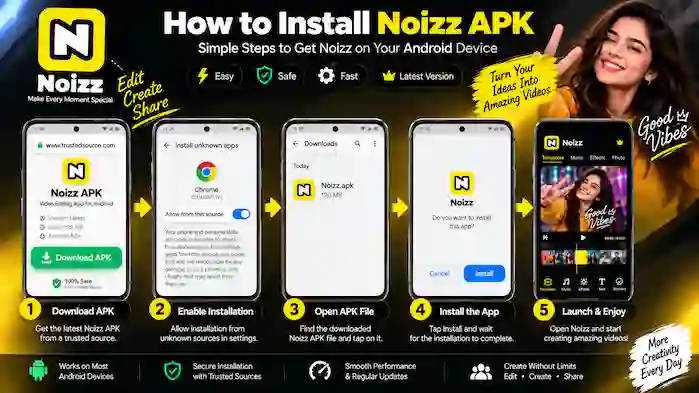
If you have obtained a legitimate Noizz APK from a trustworthy source, the general Android installation process involves opening the package and following the system’s installation prompts.
The exact steps can vary depending on your Android version and device manufacturer.
A basic workflow is:
Verify the APK → Open the package → Review Android’s warnings or permissions → Install → Launch the app
If Android displays a security warning, don’t automatically bypass it. First determine why the warning appeared and whether you trust the source of the file.
If an APK fails to install, downloading another random copy is not necessarily the best solution. Check compatibility and file authenticity first.
Noizz APK Permissions
Permissions determine what parts of a device an application can access.
A creative editing application may need access to certain media or device functions to provide features such as importing photos, selecting videos, or creating content.
Before approving permissions, consider whether each request makes sense for the feature you want to use.
For example, access related to photos or media can be relevant to an editing application. A permission that appears unrelated to the app’s purpose deserves closer attention.
You can also review and manage application permissions through Android’s settings, depending on your device and operating-system version.
Is Noizz APK Safe?
The answer depends heavily on where the APK comes from and whether it has been modified.
An APK downloaded from an unknown third-party website should not automatically be considered safe simply because its filename says “Noizz APK.”
Potential risks with unofficial APK files include:
- Modified application code
- Unwanted software
- Excessive permissions
- Privacy concerns
- Fake versions
- Outdated software
- Security vulnerabilities
For this reason, users should prefer official or verified distribution channels whenever possible.
If an APK is necessary, carefully evaluate the source, version, publisher information, permissions, and available security information before installing it.
Avoid Modified Noizz APK Files
You may encounter websites advertising modified, cracked, patched, or “premium unlocked” versions of applications.
These files have potentially been altered from the original application.
The problem is that you may not know what changes were made. A modified package could introduce unexpected behavior, security problems, or privacy risks.
For that reason, an original and legitimately distributed application is generally a safer choice than an unknown modified APK.
Don’t install a modified APK merely because it claims to unlock additional features.
Older Noizz APK Versions
Some Android users search for older APK versions because a newer release may not work well with an older device or because they are looking for a previous version of the interface.
Older versions can sometimes provide compatibility with older environments, but there are important trade-offs.
An older APK may:
- Lack newer features
- Contain unresolved bugs
- Have compatibility limitations
- Miss security improvements
- Stop working with newer online services
- Become increasingly difficult to maintain
If you are considering an older Noizz APK, first determine whether a current compatible version is available.
Using old software simply because it is easier to find isn’t always the best option.
Noizz APK Updates
Keeping an application updated can provide access to improvements, bug fixes, compatibility changes, and new features.
Manual APK installations can make updates less convenient than standard app-store installations because you may need to verify and install newer packages yourself.
Before replacing an existing version with another APK, check:
- Version number
- Release information
- Compatibility
- Source
- Application authenticity
- Whether the newer package is actually required
Avoid replacing a working application with an unknown APK just because a website labels it as the “latest version.”
Noizz APK Security Checklist
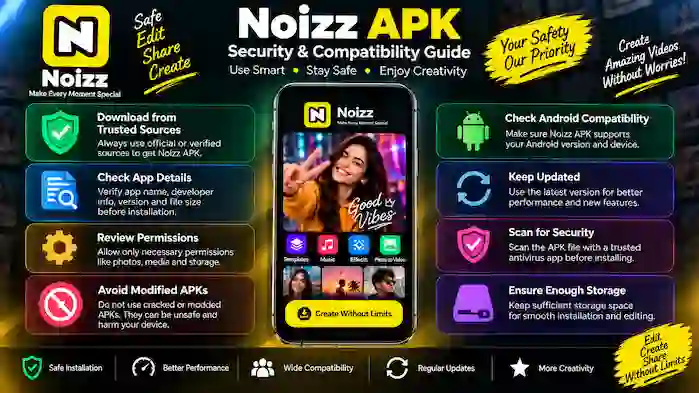
Before installing any APK, use a simple security checklist.
1. Check the Source
Use an official or reputable distribution source whenever possible.
2. Verify the Publisher
Confirm that the application is actually associated with the expected developer or publisher.
3. Check the Version
Compare the version information with reliable application information.
4. Review Permissions
Make sure requested permissions are reasonable for the app’s intended functions.
5. Avoid Cracked Versions
Do not rely on modified APKs that promise unlocked or premium functionality.
6. Pay Attention to Warnings
Android security warnings should be investigated rather than automatically ignored.
7. Keep Your Device Updated
Current Android security updates can help protect your device against known vulnerabilities.
Common Noizz APK Problems
APK-related problems are often caused by compatibility issues, damaged files, insufficient storage, or unsuitable versions.
Noizz APK Is Not Installing
If installation fails, check your Android version, available storage, and the APK’s compatibility.
A damaged or incomplete package can also cause installation problems.
APK Installation Is Blocked
Android may prevent an installation because of device security settings or because the package comes from a source Android does not recognize.
Instead of immediately disabling security protections, determine whether the file is legitimate and whether an official installation option is available.
Noizz Crashes After Installation
An application can crash when the installed version is incompatible with the device or when the device does not have sufficient resources.
Check whether a legitimate compatible version is available.
Noizz Runs Slowly
Video editing can place a higher workload on a phone than basic applications.
Freeing storage, closing unnecessary background apps, and using smaller projects may help on devices with limited resources.
Features Are Not Working
Some features may depend on the application version, device compatibility, internet connection, or online services.
Check that you are using a legitimate and compatible version before assuming the APK itself is defective.
APK File Cannot Be Opened
If Android cannot recognize or open a package correctly, the file may be incomplete, incompatible, or not actually a valid Android application package.
Verify the file and its source rather than downloading multiple unknown copies.
How to Choose the Right Noizz APK Version
There isn’t necessarily one APK version that is best for every Android device.
The appropriate version depends on factors such as:
- Android version
- Device capabilities
- Application requirements
- Version availability
- Compatibility
- Security status
The newest version is generally preferable when it is compatible with your device and comes from a legitimate source.
If you’re using an older Android phone, check compatibility before installing anything.
Noizz APK FAQs
What is Noizz APK?
Noizz APK is an Android application package used to install the Noizz app on compatible Android devices.
Is Noizz APK different from the Noizz app?
The APK is the package used for Android installation, while the app is the software installed on the device. An app-store installation normally handles the package installation automatically.
Is Noizz APK safe?
Safety depends on the source and authenticity of the file. APKs from unknown or modified sources can create security and privacy risks.
Should I download a modified Noizz APK?
It is better to avoid modified or cracked APKs from unknown sources because you cannot reliably determine what changes have been made.
Can I use Noizz APK on an older Android phone?
That depends on the APK’s Android requirements and the capabilities of your device. Always check compatibility before installation.
Why won’t my Noizz APK install?
Possible causes include an incompatible Android version, insufficient storage, a damaged package, or an unsuitable APK version.
Should I use an older Noizz APK?
An older version may help with compatibility in some situations, but it can lack current features, fixes, and security improvements.
How do I check Noizz APK permissions?
Review the permissions shown during installation and through your Android device’s application settings. Only approve permissions that make sense for the app’s intended functionality.
Can an APK be updated?
Yes, but the update process depends on how the application was installed and where the newer version comes from. Always verify the source before replacing an existing version.
Final Thoughts
Noizz APK can be useful when users need information about Android application packages, compatibility, manual installation, or specific versions. However, an APK should never be judged by its filename alone.
Before installing any Noizz APK, verify its source, publisher information, version, Android compatibility, permissions, and security status. Official distribution channels should generally be preferred when available.
If an older version is required, remember that outdated software may lack newer features, compatibility improvements, and security fixes. Similarly, modified or cracked APKs should be avoided when their origin and modifications cannot be trusted.
By checking these factors before installation, Android users can make a more informed decision about which Noizz version is appropriate for their device.